The Part Nobody Watches Until It Strands a Machine
Every single transaction runs through the receipt printer. It produces the record your customer walks away with. And inside it sits the cutter mechanism — the part that fails in ways that look unrelated at first. A torn receipt. A jam at the exit. A printer that quietly stops after a cut.
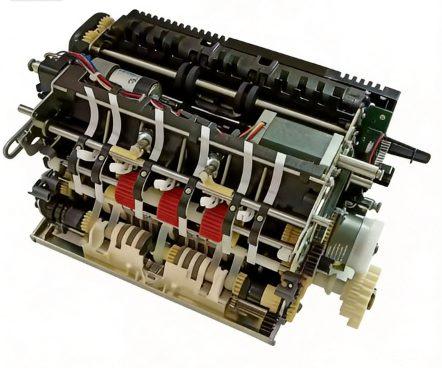
On NCR 66xx-series and SelfServ 22E machines, that cutter is the F307 mechanism. The part number that keeps showing up in field orders is 998-0911396.
This guide is what we hand our own field engineers. No filler. Just the part, the models it fits, how it fails, and the one mistake that keeps sending techs to the wrong subsystem.
The Part: 998-0911396 (F307 Cutter Mechanism)
Part number: 998-0911396 (also written 9980911396)
Item: NCR Receipt Printer Cutter Mechanism, F307
Brand: NCR
What it does: cuts the thermal receipt cleanly at the end of each transaction
One warning before you order: don't confuse this with 009-0027569. That number is the complete 6622E Low-End Leap thermal receipt printer assembly — the whole printer, not just the cutter. Suppliers routinely list the two together, and ordering the printer when you only need the cutter (or the other way around) is a costly mistake. If the printer still feeds and prints but the cut is bad, you want 998-0911396.
Compatible Models
The F307 cutter fits the NCR 66xx receipt-printer family and the SelfServ 22E line:
NCR 66xx series: 6622, 6625, 6683, 6687
NCR SelfServ 22E / 6622E
NCR SelfServ 20 series: 2062, 2064
There are alternate part numbers worth knowing, too. Suppliers list this same cutter assembly under three numbers — 998-0911396, 497-0468590, and 497-0468589. All three are the 66-series receipt printer cutter. If a quote comes back with a different number, it's the same part. Don't order twice thinking they're different.
Five Ways This Cutter Fails
1. Dull blade — cutting becomes tearing. A worn blade stops slicing and starts ripping, leaving ragged edges and half-cut receipts. The fix is a replacement cutter, not a sharpening job.
2. Sticky residue from low-grade thermal paper. Cheap paper coatings leave adhesive residue that builds up on the blade edge and the home-position sensor. The cutter cuts, then doesn't return home — and the printer locks.
3. Dried lubrication. In high-temperature or high-dust environments the cutter's grease breaks down, the mechanism binds mid-stroke, and the printer jams.
4. Paper-fragment jams. A torn receipt fragment left in the path jams the next cut. Clearing the path is a manual job, but if it keeps happening, the blade is the culprit.
5. Faint print (print head, not cutter). If the receipt prints but looks faded, that's the print head wearing out, not the cutter. Clean with an IPA swab first. If the print stays faint, the head needs replacement. Different part — don't mix them up.
Error Codes — The Cross-Platform Trap
This is the part that costs field engineers hours.
Receipt-printer fault codes are not standardized across ATM brands. Codes that look almost identical point to completely different subsystems. A real example we've seen trip people up: on Hyosung and GenMega machines, code 20002 means "Low Cash" — a dispenser-level alert that has nothing to do with the printer.
Receipt-printer codes on those platforms belong to a different code family entirely. Hyosung runs two code formats — newer firmware reports seven-digit codes like 2001000 (receipt paper jam), 2080700 (no receipt paper), 2080800 (receipt paper cutting error), while older machines still throw five-digit codes. GenMega uses the short format — 20010 (receipt paper jam), 20012 (paper release lever open), 20013 (receipt paper empty).
So when you're standing in front of an NCR machine, don't assume a code you remember from another brand means the same thing here.
NCR's diagnostics don't hand you one clean cutter-specific code the way some platforms do. The terminal raises a machine-level status — a paper jam, a printer fault, a device offline — and it's the physical evidence, not the number, that points to the cutter. The signs that matter: a cut that leaves ragged edges, a cutter that doesn't return home, a jam at the exit slot.
Clean Before You Replace
Before ordering a replacement, do this first.
Open the printer and remove any paper fragments from the cutter path. Wipe the blade edge and the home-position sensor with a clean, lint-free cloth and IPA. Check the thermal paper — if the coating is leaving residue, switch to a better grade before it kills the next cutter too. Then cycle the cutter manually to see whether the mechanism binds or returns cleanly.
A surprising share of "cutter failure" calls turn out to be a dirty sensor or a bad paper roll. Ten minutes of cleaning beats a part swap you didn't need.
Why Buy From MicroLinkpro
We stock the 998-0911396 F307 cutter specifically for the 66xx and 22E platforms, so we know exactly which models it fits and which it doesn't. Our CTO brings 23 years of ATM engineering experience to every part we ship. And as a second source for NCR-compatible parts, we dispatch fast from South China.
FAQ
Is 998-0911396 the same as 009-0027569?
No. 998-0911396 is the cutter mechanism. 009-0027569 is the complete 6622E thermal receipt printer assembly. If the printer still feeds and prints but the cut is bad, you want the cutter — not the whole printer.
Which models does the F307 cutter fit?
The NCR 66xx receipt-printer family — 6622, 6625, 6683, 6687 — and the SelfServ 22E (6622E).
What are the alternate part numbers for this cutter?
497-0468590 and 497-0468589. Suppliers list the same cutter assembly under these numbers, so don't order twice thinking they're different parts.
How do I tell a cutter failure from a print head failure?
Ragged or half-cut receipts, jams at the exit slot, and a cutter that doesn't return home all point to the cutter. Faded but otherwise clean print points to the print head — clean it with an IPA swab first, and only replace the head if the print stays faint.
Ordering
Part: NCR Receipt Printer Cutter Mechanism F307, PN 998-0911396
Condition: New / Refurbished options available
Response: We reply within 12 hours
Email: linda.zhou@microlinkpro.com
WhatsApp: +852 93572135
Website: microlinkpro.com
Last updated: 2026-08-19
Reviewed by: Max Liu, CTO (23 years ATM engineering)
Copyright Owned by Guangzhou MicroLinkpro Technology Co., Ltd.